The calculator that should exist.
Every programmer needs to convert between hex and decimal. Check a bitmask. Do quick bitwise math. macOS Calculator has a programmer mode buried in a menu, and it's clunky.
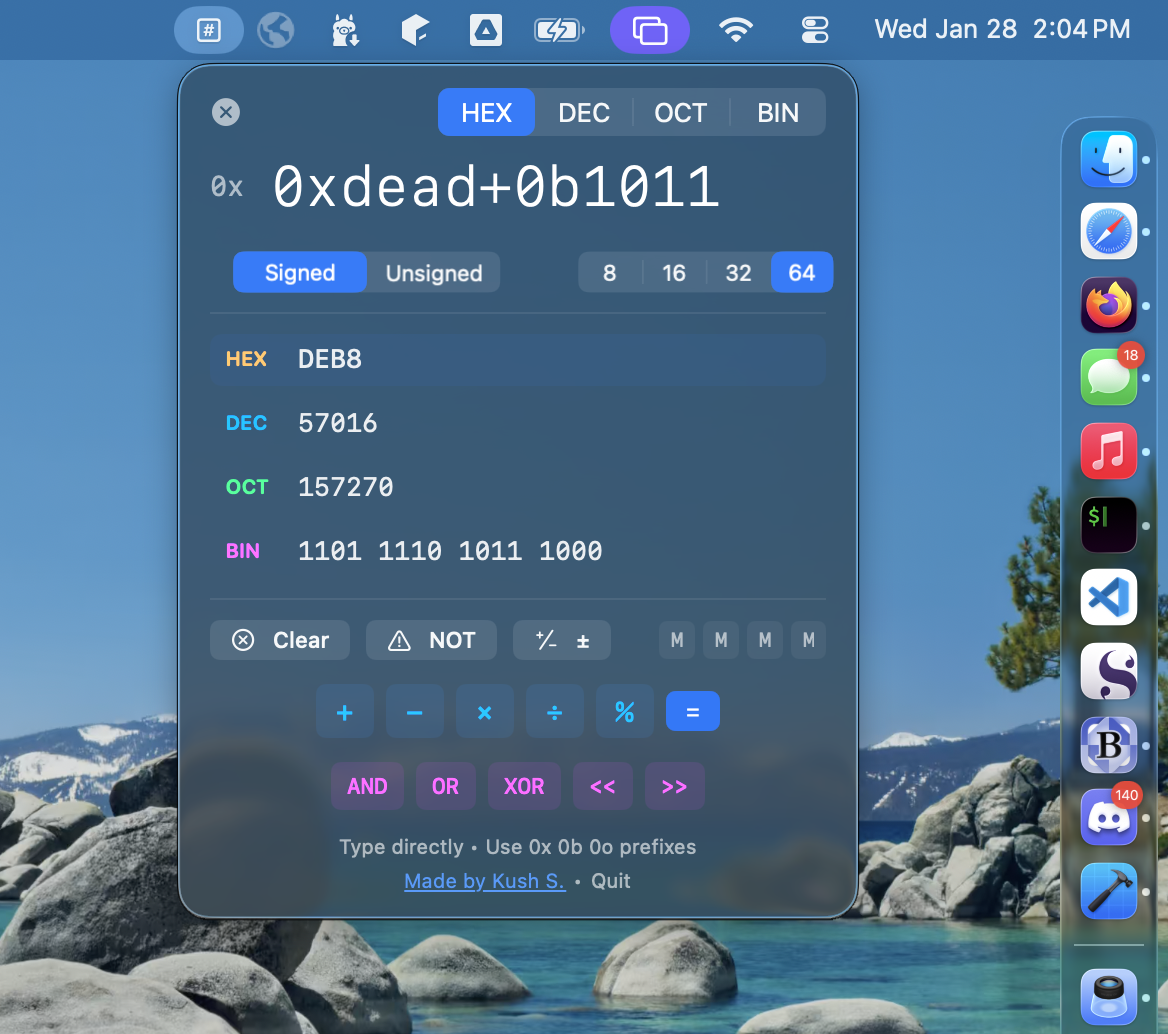
Hexa lives in your menu bar. Click it, type a value, see all representations instantly. Type expressions like 0xdead + 0xbeef and watch it evaluate live. Native Swift, native SwiftUI, opens instantly.
📍
Menu Bar Native
Lives in your menu bar. One click to open, one click to dismiss. Always there when you need it.
⚡
Live Evaluation
Type expressions directly: 0xff + 0x10, 255 << 8, 0b1010 | 0b0101. Results update as you type.
🔢
All Bases, All the Time
See hex, decimal, octal, and binary simultaneously. Use 0x, 0b, 0o prefixes freely in expressions.
📐
Bit Width Control
Toggle between 8, 16, 32, and 64-bit modes. Signed and unsigned display.
📋
One-Click Copy
Hover over any conversion to reveal copy button. Values copied clean, without formatting.
🍎
Universal Binary
Native on Apple Silicon and Intel. Pure Swift and SwiftUI. No Electron, no web views.
Full expression support with chained operations.